
If you're suddenly receiving emails after an adult signup you don't remember, your email address was most likely exposed in a data breach, scraped from a public profile, or entered by someone else without your knowledge. This is not evidence that you visited adult sites. The single most important thing you can do right now: do not click any link in those emails.
Stop before you click. Clicking a confirmation or unsubscribe link in an unsolicited adult-site email tells the sender your address is active. That single action can multiply the volume of spam you receive. Mark the email as spam, block the sender, and close the message.
Three things to do in the next two minutes:
- Mark as spam and block the sender inside your mail client.
- Archive or bulk delete without opening attachments or clicking links.
- Change your email password if anything about the timing feels suspicious or targeted.
Key Takeaways
Unsolicited adult-site signup emails almost always trace back to a data breach, address scraping, or deliberate mailbait, and the fastest resolution is to secure your email account and report without engaging the emails themselves.
| Point | Details |
|---|---|
| Don't click anything | Never follow links in unsolicited signup emails; even "unsubscribe" links confirm your address is live. |
| Secure your account first | Change your password, enable 2FA, and check forwarding rules within 15 minutes of noticing the problem. |
| Check for breaches | Run your address through HaveIBeenPwned to identify which service exposed your data and which passwords to change. |
| Request account removal | Use the site's "Forgot password" flow to confirm an account exists, then contact support with email headers as evidence. |
| Report targeted harassment | File with the FTC at reportfraud.ftc.gov or IC3 at ic3.gov if the signups appear deliberate and repeated. |
Table of Contents
- Why you're getting adult signup and confirmation emails
- What to do right now: a time-ordered checklist
- How to harden your email and linked accounts
- How to check whether your address leaked and clean up your inbox
- How to confirm whether an account was created and request removal
- Whether this is illegal and where to report it
- Why clicking those links almost always makes things worse
- A note from the editor
- Useful resources for remediation
- Sources
Why you're getting adult signup and confirmation emails
Receiving adult-themed signup emails rarely reflects your own browsing history. Spammers build mailing lists through automated scraping of public forums, old social profiles, and comment sections. They also purchase lists compiled from past data breaches, where millions of addresses change hands for very little money.
A second common cause is "mailbait," where someone deliberately enters your email address into dozens of signup forms to flood your inbox. Automated bots run the same playbook at scale, signing up random or harvested addresses across hundreds of sites simultaneously. Google Support threads document cases where users received hundreds of confirmation emails within a single hour, all from automated campaigns.
Your inbox is a target, not a confession. Adult-themed spam is a preferred vector for bulk senders precisely because curiosity and embarrassment drive higher open rates. Spammers exploit that psychology to confirm live addresses and sell them onward.
A few specific exposure paths worth knowing:
- Old forum accounts with a public email field, even from a decade ago, are routinely scraped.
- Pre-checked consent boxes on unrelated signup forms can bundle your address into partner marketing lists without you noticing.
- Third-party data sharing at signup means one breach at a retail or gaming site can land your address on adult-themed lists months later.
- Re-used email addresses tied to multiple accounts multiply your exposure surface significantly.
For a deeper look at how bots harvest addresses from public profiles, Thegoondude's blog covers the mechanics in detail.
What to do right now: a time-ordered checklist
Safety comes first. Never click a confirmation link, an unsubscribe button, or any URL inside an unsolicited adult-site email. Even a "legitimate-looking" unsubscribe link in a spam message can confirm your address and trigger more mail.
In the next 1 minute:
- Select all similar emails in your inbox using your mail client's search or filter.
- Mark them as spam or junk (this trains your provider's filter).
- Block each sender domain, not just the individual address.
- Report abuse if your provider offers a one-click report button (Gmail's "Report phishing" or Outlook's "Report" option).
In the next 15 minutes:
- Change your email password to something unique and at least 16 characters long.
- Enable two-factor authentication (2FA) on your email account if it isn't already on.
- Go to your account's "Security" or "Recent activity" page and sign out of all other sessions.
- Check your forwarding rules and filters. Look for any rule you didn't create that moves, copies, or deletes incoming mail.
Within the next 60 minutes:
- Run a malware scan on your device using a reputable tool such as Malwarebytes or Windows Defender.
- Review your account recovery options: check that the backup phone number and recovery email are still yours.
- Set up a filter to auto-archive future messages from known spam domains.
- Consider creating a disposable alias for any future adult-site signups.
Pro Tip: Use your email provider's built-in security checkup page, not any link inside a suspicious email. For Gmail, go directly to myaccount.google.com/security. For Outlook, visit account.microsoft.com/security. Both pages show active sessions, connected apps, and recovery settings in one place.
Community reports confirm that bulk-filtering and provider-level spam reporting are the fastest path to reducing volume, typically within a few days for most mail clients.
How to harden your email and linked accounts
Changing your password is the starting point, not the finish line. A strong, unique password means one that isn't shared with any other account and isn't based on a dictionary word or personal detail. A password manager like Bitwarden or 1Password generates and stores these without requiring you to memorize them.
Beyond the password, check these four things inside your account settings:
- Active sessions: Revoke any session you don't recognize, especially from unfamiliar locations or devices.
- App passwords and connected apps: Remove any third-party app that has access to your email and that you no longer use or don't recognize.
- Recovery address and phone number: Confirm these are still yours. An attacker who changes your recovery contact can lock you out permanently.
- Forwarding rules: Search your filters for any rule that forwards mail to an external address. Delete anything you didn't create yourself.
Microsoft's privacy and security guidance recommends reviewing these settings regularly, not just after an incident. For Google accounts, the Security Checkup at myaccount.google.com/security walks through each of these areas in a single session.
For future signups on adult platforms or any site you're uncertain about, use a masked or alias email address. Services like SimpleLogin or Apple's Hide My Email generate a forwarding address that keeps your real inbox private. If that alias starts receiving spam, you delete it without touching your primary address.

How to check whether your address leaked and clean up your inbox
Start with HaveIBeenPwned. Enter your email address and the tool cross-references it against a database of known data breaches. If your address appears, the results show which breach exposed it and what data was included (passwords, phone numbers, usernames). That tells you which accounts to prioritize for a password change.
If your address is listed, take these steps:
- Change the password on every account that used the same credentials as the breached service.
- Check whether any of those accounts are linked to your primary email.
- Enable 2FA on all high-value accounts (banking, email, social media) immediately.
For inbox cleanup without clicking anything suspicious:
- Use your mail client's search bar to find phrases like "confirm your registration," "verify your email," or "complete your signup." Preview the results without opening them.
- Select all matching emails and bulk-delete or archive them.
- Create a filter that sends future messages containing those phrases directly to spam or trash.
For safe unsubscribing from legitimate senders, use the List-Unsubscribe header method inside Gmail or Outlook rather than clicking the link in the email body. Both clients surface this as a one-click "Unsubscribe" button at the top of the message, which routes through the provider's own infrastructure rather than the sender's server.
How to confirm whether an account was created and request removal
Do not click the confirmation link to find out whether an account exists. Instead, go directly to the adult site's login page and use the "Forgot password" or "Account recovery" flow with your email address. If the site returns a "password reset sent" message, an account exists under your address.
Steps to request removal:
- Locate the site's support, contact, or abuse page (usually linked in the footer as "Contact Us," "Support," or "Report Abuse").
- Send a removal request from your email address. Keep it factual and brief.
- Attach or paste the email headers from the original signup confirmation as evidence (in Gmail: three-dot menu > "Show original"; in Outlook: File > Properties).
- Request written confirmation that the account and your personal data have been deleted.
- If the site doesn't respond within 7 days, escalate to the platform's abuse team or file a complaint with the FTC.
Here is a copy-paste template:
For context on what to expect from specific platforms, Thegoondude's verified adult site directory includes notes on each site's support responsiveness and privacy practices across 445 reviewed platforms.
Pro Tip: Save the email headers and any support ticket numbers before you delete the original emails. If the issue escalates to a legal complaint, those timestamps and routing details are your primary evidence.
Whether this is illegal and where to report it
Deliberately signing someone up for adult sites without their consent can constitute harassment or identity misuse under U.S. law, depending on intent, frequency, and state statutes. It doesn't always rise to a criminal threshold on its own, but repeated, targeted campaigns may.
Reporting options in the United States:
- FTC (Federal Trade Commission): File a report at Reportfraud. The FTC tracks spam and identity misuse patterns and uses reports to build enforcement cases.
- IC3 (Internet Crime Complaint Center): File at Ic3 for cases involving clear criminal intent, such as targeted harassment or doxxing combined with mass signups.
- Platform abuse reports: Most adult sites have an abuse or report form. Include your email address, the dates of the signup emails, and the email headers as evidence.
- Local law enforcement: If the signups are part of a broader harassment campaign targeting you specifically, a police report creates an official record that supports any future civil or criminal action.
Targeted harassment is different from generic spam. If the signup emails are combined with threats, personal information about you, or coordinated across multiple platforms, treat it as a harassment case and contact law enforcement rather than handling it as a spam problem alone.
This section is general information, not legal advice. Consult a licensed attorney for guidance specific to your situation.
Why clicking those links almost always makes things worse
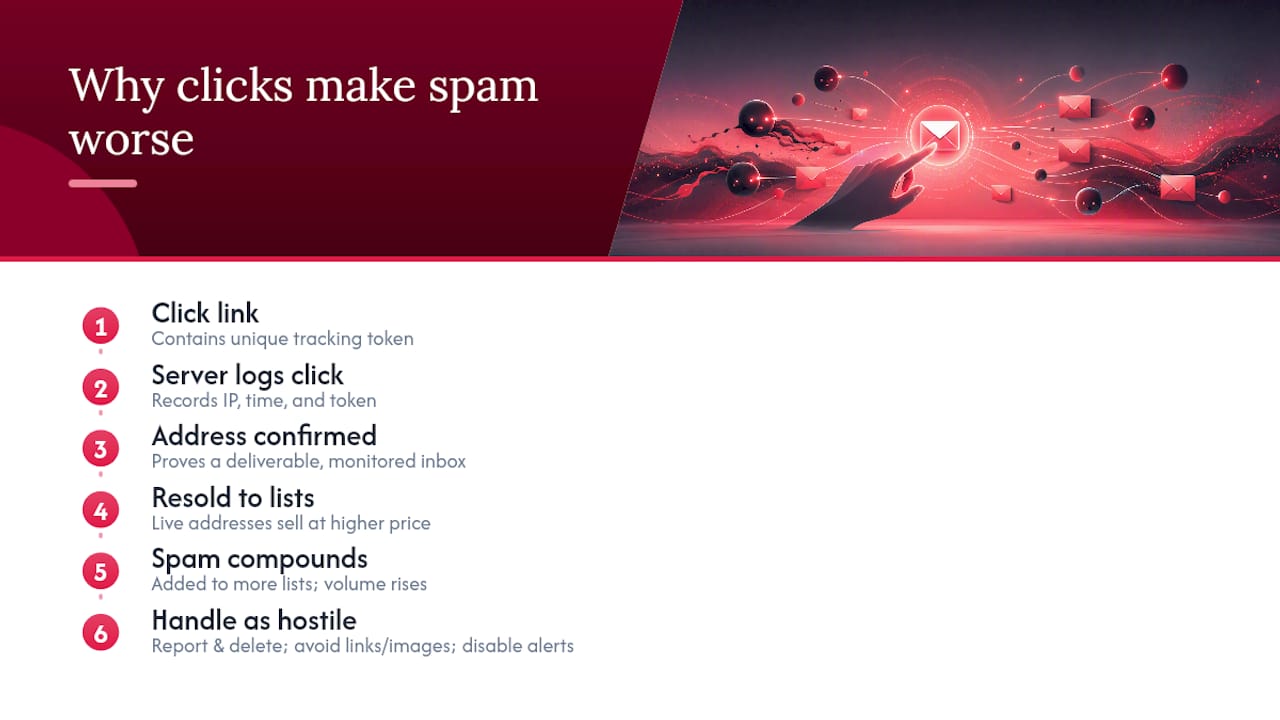
Security guidance from Ask Leo is consistent on this point: interacting with spam, whether by clicking a link, opening an image, or replying, signals to the sender that your address is active and monitored. Spammers use bounce analytics, link-click tracking, and image-load pixels to score addresses. A confirmed "live" address is worth more on resale lists than an unverified one.
Every click is a confirmation. Spammers treat engagement as proof of a deliverable, monitored inbox. That address then gets sold to additional lists at a higher price, compounding the problem rather than solving it.
The mechanism is straightforward. Confirmation emails contain unique tracking tokens in their links. When you click, the sender's server logs your IP address, the time of the click, and the token, confirming both that the address is real and that someone is reading the mail. Adult-themed spam uses this at scale because the emotional response (curiosity, embarrassment, urgency) produces higher click rates than neutral commercial email.
Pro Tip: Treat every unsolicited signup confirmation as hostile by default. Handle it entirely through your mail provider's spam reporting and bulk-delete tools. Never open attachments, load images, or follow any link, even one labeled "unsubscribe" or "opt out."
For browser-level protection, Chrome's notification permission system can automatically block sites identified as abusive. To stop push-notification spam from adult sites, disable site notifications in Chrome via Settings > Privacy and security > Site Settings > Notifications and set the default to "Don't allow sites to send notifications."
A note from the editor
The pattern we see most often at Thegoondude, after reviewing and testing 445 adult platforms across 64 categories, is that worried readers assume the worst when they receive these emails. The reality is almost always more mundane: an old forum account, a breach at an unrelated service, or someone with a grudge and five minutes to spare.
The practical posture is simple: stop, secure, and report. Don't engage with the emails themselves. Secure your account at the provider level. Check HaveIBeenPwned to understand your actual exposure. Then report if the pattern looks targeted rather than random.
This is a solvable, mostly technical problem. For readers who want to browse adult content safely going forward, Thegoondude's privacy-first browsing guides cover alias emails, browser hygiene, and how to read a site's privacy policy before you sign up.
Useful resources for remediation
Account security checkups (go directly, never via email links):
- Google Security Checkup: myaccount.google.com/security — reviews active sessions, connected apps, and recovery settings.
- Microsoft account security: Account — covers sign-in activity, privacy settings, and account protection options.
Breach checking:
- HaveIBeenPwned: Haveibeenpwned — free breach lookup; shows which services exposed your address and what data was included.
- Google Password Checkup: Built into Chrome at passwords.google.com — flags compromised, reused, or weak passwords across saved accounts.
Reporting:
- FTC fraud report: Reportfraud — for spam, identity misuse, and deceptive practices.
- IC3: Ic3 — for cases with clear criminal intent or coordinated harassment.
- Site-specific abuse forms: Check the footer of the adult site for "Report Abuse," "Contact," or "Support" links. Include email headers and timestamps in every report.
Browser notification control:
- Chrome notification settings — disable push alerts globally to block adult-site notification spam.
- Chrome site permissions — revoke per-site permissions for notifications, protocol handlers, and third-party sign-in prompts.
This article is general information, not a substitute for advice from a qualified lawyer. Consult a qualified legal professional about your own circumstances before acting on anything here.
Sources
- Does Getting Porn Spam Mean You've Been Surfing Porn Sites? - Ask Leo!
- Hundreds of emails from websites asking me to confirm registration - Google Support
- Protect your privacy online - Microsoft Support